Passing the checks isn't a guarantee: three places an AI visit can stop
Robots.txt can say yes while your firewall says no, and some AI companies keep their own lists. What each gate does, and what you can test from outside.
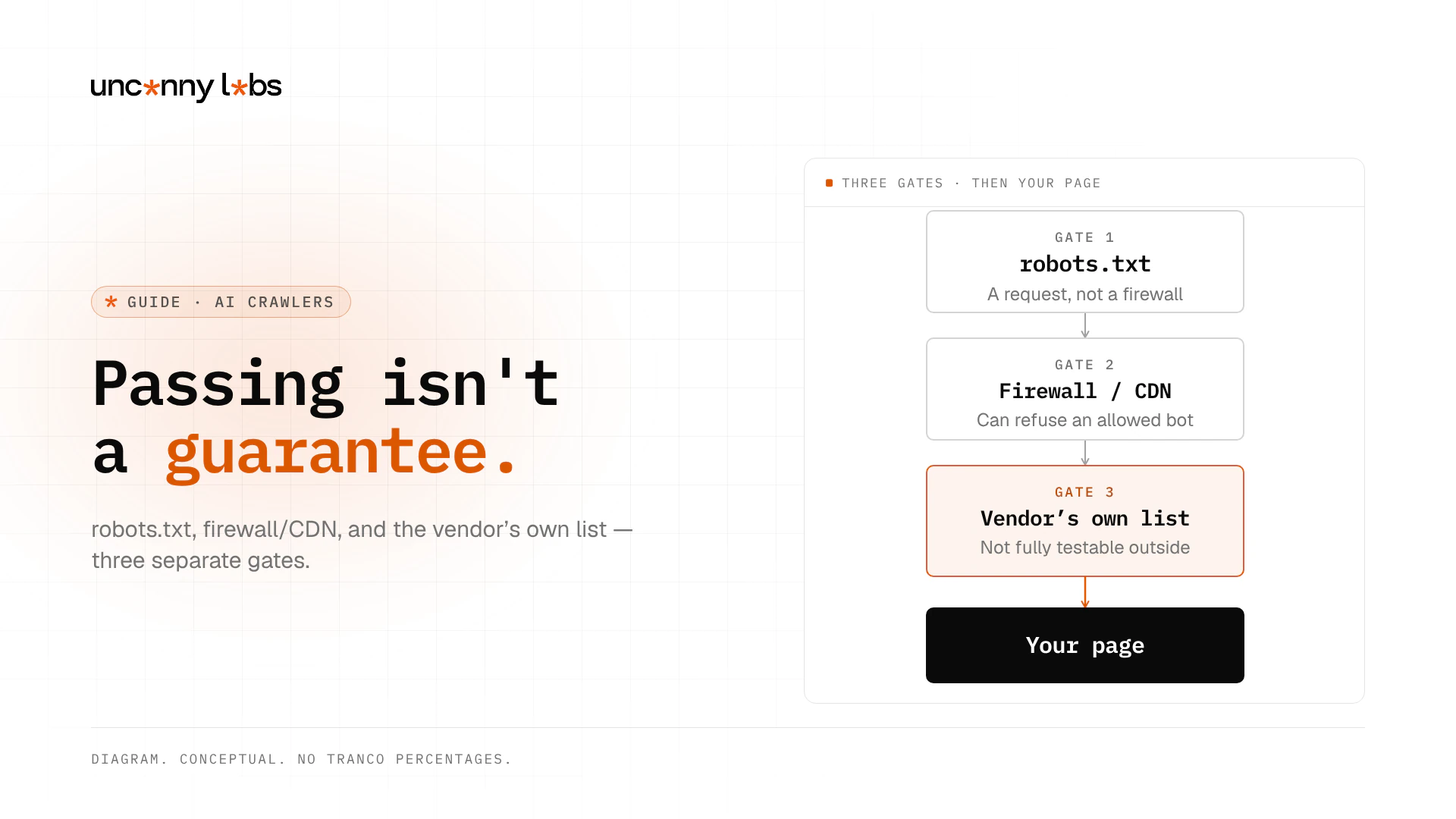
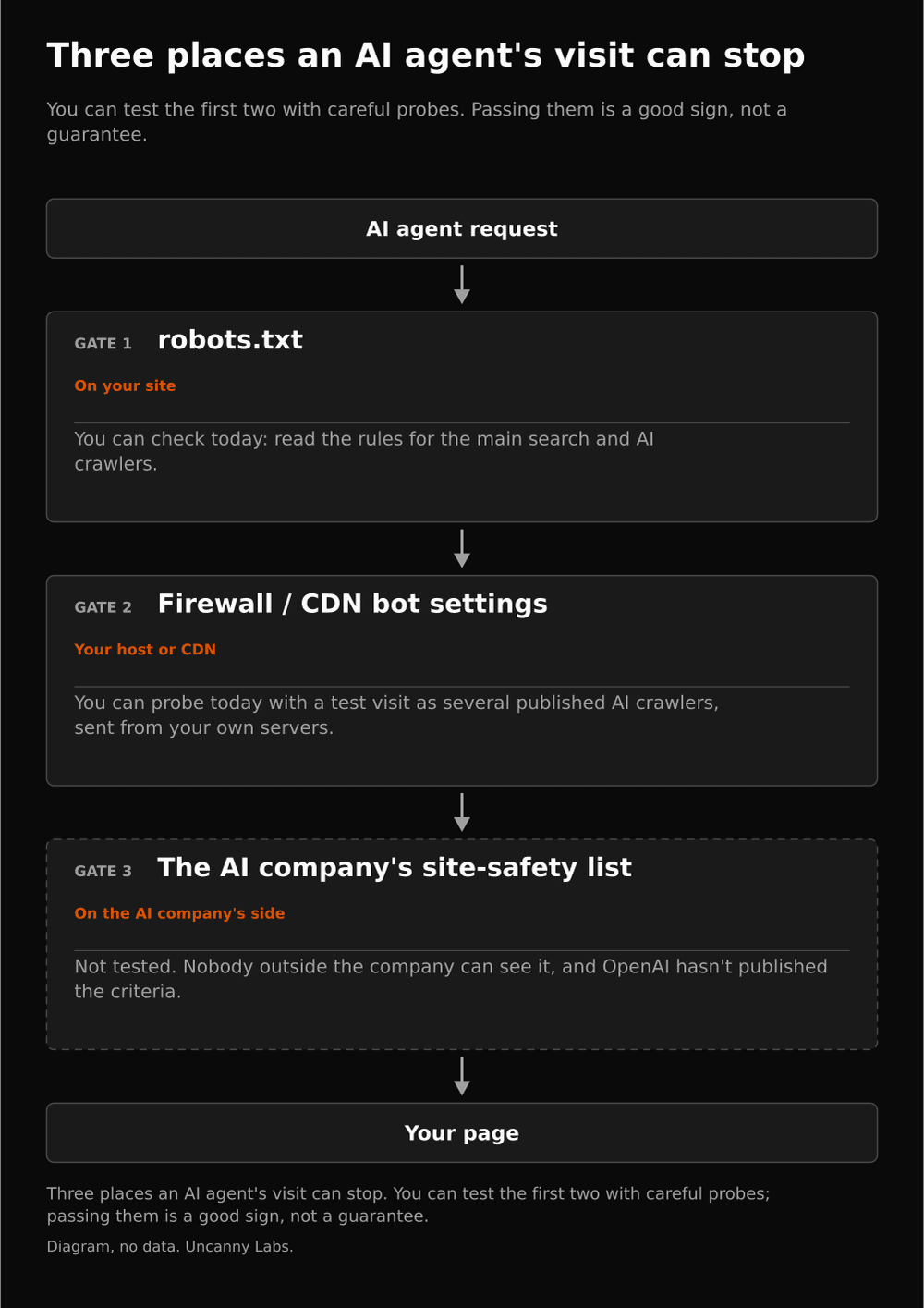
An AI visit can stop in three places: your robots.txt (a request, not a firewall), your host or CDN bot settings that can refuse an allowed bot, and an AI company's own unpublished allow or block list you cannot fully test from outside.
This Guide owns the three-gate model and what a third-party probe can and cannot prove. For how to write robots.txt groups, use the robots groups and exclusions below.
Key takeaways
- robots.txt asks; it is not access authorization (RFC 9309).
- A firewall or CDN can still refuse a bot that robots.txt allows; Perplexity documents Cloudflare Skip rules and warns that Bot Fight Mode cannot be skipped (Perplexity bots).
- Some AI companies keep their own lists. OpenAI's public bots docs do not document Aura /
site_statuscriteria; SEJ and GitHub observations are third-party, not OpenAI policy. - You can test gates 1-2 from outside with care. Gate 3 cannot be fully verified without the vendor.
- Quiet server logs when an agent fails mean no request arrived; that is not proof ChatGPT "cannot" reach you.
Three places, in the order a request meets them
| Gate | Who controls it | What a pass proves | What it does not prove |
|---|---|---|---|
| 1. robots.txt | You (the file) | The file asks the named crawler to proceed on that path | That the crawler will honour it, or that the network will allow it |
| 2. Firewall / CDN | You / your host | A request from a tested IP and UA was not refused at the edge | That the vendor's own IPs or agents will get the same result |
| 3. Vendor list | The AI company | Usually nothing you can prove from outside | Guaranteed Browser Use / agent access |
The first two sit on your side. The third sits on the AI company's side.
First: robots.txt
A robots.txt file is a list of requests. Crawlers are asked to honour them. It is not access control. RFC 9309 says these rules "are not a form of access authorization" (RFC 9309). A crawler follows the group whose user-agent line names it. If none does, it falls back to the * group (RFC 9309 §2.2.1).
Robots rules are what the file says, not proof of what agents can do. Some user-triggered fetchers may not follow the file:
- OpenAI says robots.txt rules "may not apply" to ChatGPT-User (OpenAI bots).
- Perplexity says Perplexity-User "generally ignores robots.txt rules" (Perplexity bots).
- Anthropic's Help Center states that Anthropic's bots respect do-not-crawl signals by honouring industry-standard robots.txt directives, including Claude-User (Anthropic Help 8896518). Prefer this Help article over unstable platform deep-links.
Treat the file as the first ask, then confirm the next place. For how to write the groups, see robots groups and exclusions.
Robots groups and exclusions
Supported for removing access barriers, not earning mentions. Read the file at the root of the relevant host, such as https://example.com/robots.txt. A subdomain can have different rules. Confirm you received a plain-text rules file, not a login page or an HTML error with a successful status.
Find the group matching the crawler you intend to permit. Under RFC 9309, matching named groups are combined; the wildcard group is the fallback, not an extra set of restrictions inherited by every named group. Within the applicable rules, the longest matching path wins, with Allow preferred for an equally specific conflict.
For example, this permits the listed search and user-fetch bots on public paths while keeping the stated exclusions. Adapt the paths and bot choices; this is illustrative, not a replacement for an existing site's policy.
User-agent: *
Disallow: /admin/
Disallow: /private/

User-agent: OAI-SearchBot
User-agent: PerplexityBot
User-agent: Claude-SearchBot
User-agent: Claude-User
User-agent: Googlebot
User-agent: Bingbot
Allow: /
Disallow: /admin/
Disallow: /private/
The private-path exclusions appear in both groups deliberately. Adding a named Allow group while leaving exclusions only under * can remove the request not to crawl those paths. Robots rules still do not protect confidential information: retain real authentication and access controls.
Check the intended public page and a private path against each relevant group. Do not add ChatGPT-User or Perplexity-User to this example as if that guaranteed enforcement: the provider exceptions above still apply. Anthropic's documented robots policy includes Claude-User.
A broken robots.txt response also needs provider-specific interpretation. Google's documented 5xx handling initially stops crawling for 12 hours, then uses the last good version for the next 30 days while retrying. With no cached copy, it assumes no crawl restrictions; continuing errors are handled according to wider site availability. Do not turn that into one universal rule for every bot. Restore a working file and allow for caching before concluding a change failed.
Training bots are a policy choice
Choose training permission separately from search access. These are documented roles, not promises that allowing any bot earns inclusion.
| Provider | Search or user-fetch route | Training preference | Important distinction |
|---|---|---|---|
| OpenAI | OAI-SearchBot; ChatGPT-User for user actions | GPTBot | Search and training settings are independent; user-fetch robots rules may not apply. |
| Anthropic | Claude-SearchBot, Claude-User | ClaudeBot | Restricting the search/user bots can affect their respective retrieval routes. |
| Googlebot for Search | Google-Extended | A product token, not a separate HTTP crawler; also controls documented grounding in Gemini Apps and Vertex AI, but not Search inclusion or ranking. | |
| Apple | Applebot | Applebot-Extended | Extended controls training use, not whether Applebot can crawl. |
| Common Crawl | No consumer-search bot in this comparison | CCBot | Controls collection for an open crawl dataset; not a training-only service. |
| Perplexity | PerplexityBot, Perplexity-User | No separate training bot listed here | PerplexityBot is not used to crawl for foundation-model training. |
If your chosen policy is to block these training/data-collection routes, append a separate group:
User-agent: GPTBot
User-agent: ClaudeBot
User-agent: Google-Extended
User-agent: Applebot-Extended
User-agent: CCBot
Disallow: /
Keep search bots out of that block group. Check any host-managed robots or training policy too, rather than assume your origin file is the only control. Google's Search generative AI participation setting remains a separate decision. For the full action overview, see How to improve AI visibility.
Second: firewall or CDN
Your host or CDN can refuse a bot that robots.txt allows.
Of 549 Tranco top-1,000 sites whose homepage loaded, 78 (14.2%) refused at least one of four AI crawlers (GPTBot, OAI-SearchBot, ClaudeBot, PerplexityBot) that their robots.txt allowed. Leaving out rate-limit replies (429s), it is 64 (11.7%). Source: Crawl Readiness, 12 Oct 2026, as reported in the original Crawl Readiness study. These percentages were not re-measured for this patch.
Perplexity's docs give a concrete Cloudflare note: match PerplexityBot and Perplexity-User by user agent and published IP ranges, set the rule to Skip, and place it above block rules. The same docs warn that Cloudflare's Bot Fight Mode cannot be skipped with WAF custom rules (Perplexity bots).
Cloudflare documents AI crawler and agent access policies (Search / Agent / Training behaviours; Block / Allow / Disallow for training). robots.txt Disallow remains voluntary from the network's point of view (Cloudflare). Cite concepts; do not invent private dashboard screenshots.
Many file-only checkers never see this place. In Uncanny Labs' earlier test of free checkers, a page whose firewall turned AI crawlers away with a 403 got the same result as a fully open page in 9 of the 11 tools that check crawler access. Details: free AI visibility checker test (2026) (finding cite only; not a product CTA).
Check the rule that refused the visit
Start with the relevant time and path in your firewall/CDN logs. Identify whether the response came from an AI-bot policy, a custom block, a country rule, a rate limit or a browser challenge. Match a claimed user agent with the vendor's published IP information or your provider's verified-bot mechanism; the name alone is spoofable.
- Cloudflare: In Security > Settings, inspect AI Crawler and Agent access policies. Review Search, Agent and Training independently. Allowing a behavior here does not prove every other security rule permits it. For Perplexity, follow its documented matching-UA-and-IP Skip rule above blocking rules; Bot Fight Mode cannot be skipped by WAF custom rules. Cloudflare policy documentation and Perplexity's configuration describe different parts of that check.
- Vercel: Open Firewall > Rules and inspect AI Bots Managed Ruleset. Current documentation separates AI Crawlers from AI Assistants. For the category you intend to allow, review Deny versus Log or inactive/Allow. If Bot Protection serves a challenge, examine a narrowly scoped custom Bypass rule rather than disable unrelated protections. Vercel's ruleset documentation explains execution order.
- Akamai: Inspect Bot Manager's validated or custom bot category and the action it triggers. Monitor the relevant traffic before deciding which wanted bots to permit; do not leave the desired category denied. Akamai documents category-based handling, not one universal AI-dashboard switch.
An HTTP 402 can be a deliberate charging policy. Cloudflare Pay Per Crawl returns pricing rather than page content when payment intent is absent. Check which policy generated it; not every 402 proves Cloudflare is in use. Keep charging only if it matches the publisher's decision.
After an authorized change, inspect the resulting logs and response. A probe from another server does not originate from the vendor's IP ranges and cannot certify vendor access. An IP-restricted site may correctly refuse that probe. Record the tested server, user agent, response and time instead of calling every refusal a broken rule.
Third: the AI company's own list
OpenAI's public crawlers page documents OAI-SearchBot, GPTBot, and ChatGPT-User roles and IP endpoints. It does not document Aura, site_status, or unpublished blocklist criteria (OpenAI bots).
What sits beyond that guard is observed, not specified by OpenAI:
- A Search Engine Journal contributor (Dan Taylor, 29 Oct 2026) reported a
chatgpt.com/backend-api/aura/site_statuscheck, a 24-hour local cache of a block, and coverage of ChatGPT live search and Codex Browser Use (SEJ). This is a contributor network observation, not an OpenAI specification or policy. - A related user report is open on GitHub as openai/codex#29343. An issue thread is not OpenAI product documentation.
OpenAI has not published Aura criteria or a public appeal process in the bots docs fetched for this Guide. Do not invent one.
Practical check from the same SEJ write-up (still observation, not policy): if your logs show no request at the time an agent refused, the block is probably not yours. A site-side block leaves a 403, a challenge, or a WAF event. Never read a quiet log as "ChatGPT can't reach you." It only means no request arrived.
What you can check yourself today
- Read your robots.txt groups. Check the named AI crawlers and the
*fallback. Write groups carefully (robots groups and exclusions). - Check your firewall or CDN bot rules. Look for Bot Fight Mode-style switches, and for Skip rules that sit above blocks. Match user agent and published IP ranges where the vendor publishes both.
- Compare server logs to the times an agent failed. No request at that moment points away from your site. A 403, a challenge, or a WAF event points at you.
- Remember that early agent standards such as llms.txt state wishes. They do not block anything, and they do not open a closed door either.
Analytics is a different question from access. If you are measuring clicks and impressions after a visit succeeds, see how to measure AI traffic.
Sitemap discovery is not an access gate
Info/ungraded. A sitemap lists pages for discovery. It is not permission to fetch them, a fourth gate, or evidence they will be indexed or cited.
- Open the advertised sitemap or sitemap index. For an XML sitemap, confirm it returns XML rather than a login screen, HTML fallback or error page. Follow an index to its child files.
- List fully qualified canonical URLs, such as
https://example.com/guide, not relative paths. Leave out redirects, deliberate noindex pages and URLs you do not want indexed; check the destination response as well as the listing. - Keep each sitemap within 50,000 URLs and 50 MB uncompressed; split larger sets and use a sitemap index. Google's sitemap guide and the XML protocol describe the formats and limits.
- Check the absolute pointer in robots.txt separately from Allow/Disallow rules:
Sitemap: https://example.com/sitemap.xml
The pointer does not override a blocked path, an indexing restriction or a firewall refusal. A valid sitemap remains a discovery hint, not a crawl or citation guarantee. AgentReady's sitemap SHOULD is a specification label, not measured citation efficacy. Use these sitemap discovery checks alongside the access checks, not instead of them.
What a third-party probe can and can't prove
A third-party probe (from someone else's servers, not the AI company's IPs) can test gates 1-2 for that run: whether robots.txt allows a named crawler, and whether an edge request with a published UA was refused. A block on a probe is likely evidence of a site-side issue, not a certainty that every vendor IP will see the same result.
A third-party probe cannot test gate 3 (the AI company's own list). Nobody outside the AI company can fully verify unpublished allow or block criteria.
Passing gates 1-2 from a test visit means those two places looked open from the probe's servers on that run. It is a good sign. It is not a guarantee of Browser Use, agent browsing, or vendor search access.
FAQ
Is robots.txt a firewall?
No. It is a request file. RFC 9309 says the rules are not a form of access authorization. A firewall or CDN can still refuse the request.
Can a CDN block a bot that robots.txt allows?
Yes. That is gate 2. Host and CDN bot settings can refuse a crawler even when robots.txt allows it. Perplexity documents Cloudflare Skip guidance and a Bot Fight Mode caveat.
Do ChatGPT-User and Perplexity-User always follow robots.txt?
No. OpenAI says robots.txt rules may not apply to ChatGPT-User. Perplexity says Perplexity-User generally ignores robots.txt. Anthropic's Help Center says its bots honour robots.txt directives; cite the Help article rather than unstable platform URLs.
Can I test OpenAI's Aura or blocklist from outside?
Not fully. OpenAI's public bots docs do not document Aura criteria. SEJ and GitHub reports describe observations; they are not OpenAI policy. Quiet logs only show that no request arrived.
Where do robots groups fit in the three-gate model?
Robots groups belong to the first gate. The firewall/CDN is a separate check, and vendor-side criteria remain outside a third-party probe's full visibility. Use robots groups and exclusions above.
What does a quiet log mean when an agent fails?
It means no request hit your origin at that moment. That often points away from your firewall. It is not proof that ChatGPT or another agent can never reach you.
Sources
Primary docs re-checked 19 Nov 2026 (Asia/Shanghai). Aura / Codex items labelled as third-party observations.
- RFC 9309 Robots Exclusion Protocol
- OpenAI crawlers / bots
- Perplexity bots guide
- Cloudflare AI crawler and agent access policies
- SEJ: OpenAI's Aura safety check (Dan Taylor, 29 Oct 2026; observation ≠ OpenAI policy)
- GitHub openai/codex#29343 (issue thread ≠ product docs)
- Anthropic Help: Does Anthropic crawl data… (8896518)
- Crawl Readiness: AI crawler access, 12 Oct 2026 (dated study, not remeasured)