How to Measure AI Traffic: ChatGPT's UTM Tag, GA4, Search Console and Bing
How to measure visits from AI agents: ChatGPT's utm_source=chatgpt.com tag, a GA4 channel, Search Console's AI report, Bing's AI data, and their limits.
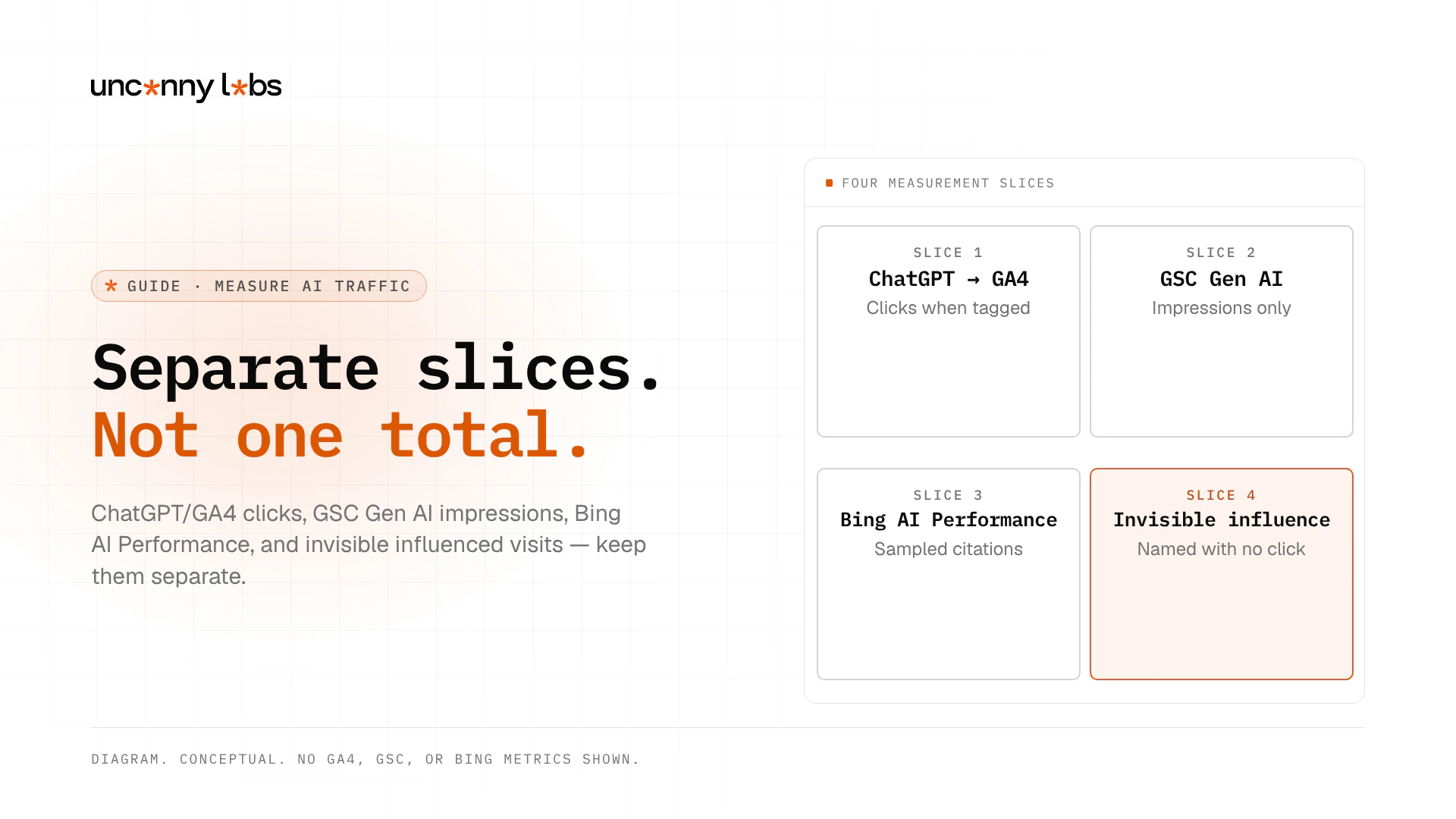
Measure AI traffic as separate slices: ChatGPT clicks often carry utm_source=chatgpt.com into GA4, Google's Generative AI performance report shows AI Overviews and AI Mode impressions (not a full click or query ledger), and Bing Webmaster Tools' AI Performance views show sampled grounding and citation signals, while many influenced visits remain invisible.
This Guide is for marketing and SEO leads who need one place to learn what each measurement surface can and cannot see. For the deep dive on Google's one report, see Search Console's Generative AI report.
Key takeaways
- ChatGPT answer links often carry
utm_source=chatgpt.comwhen tagged; check Session sourcechatgpt.comin GA4, not only the AI Assistant channel. - Google's Generative AI performance report shows impressions for AI Overviews and AI Mode; those impressions are already in your normal Performance (Web) totals, so do not add them twice. (Search Central Blog, Help)
- Bing AI Performance shows sampled grounding queries and citations; Topics Portfolio is a beta and directional. (Bing, 10 Feb 2026, 13 Oct 2026)
- No tool sees every visit an AI answer influences; answers that name you with no click never reach analytics.
- There is no single "AI traffic" number; keep clicks, impressions, and citations as separate lines.
What each tool can and can't see
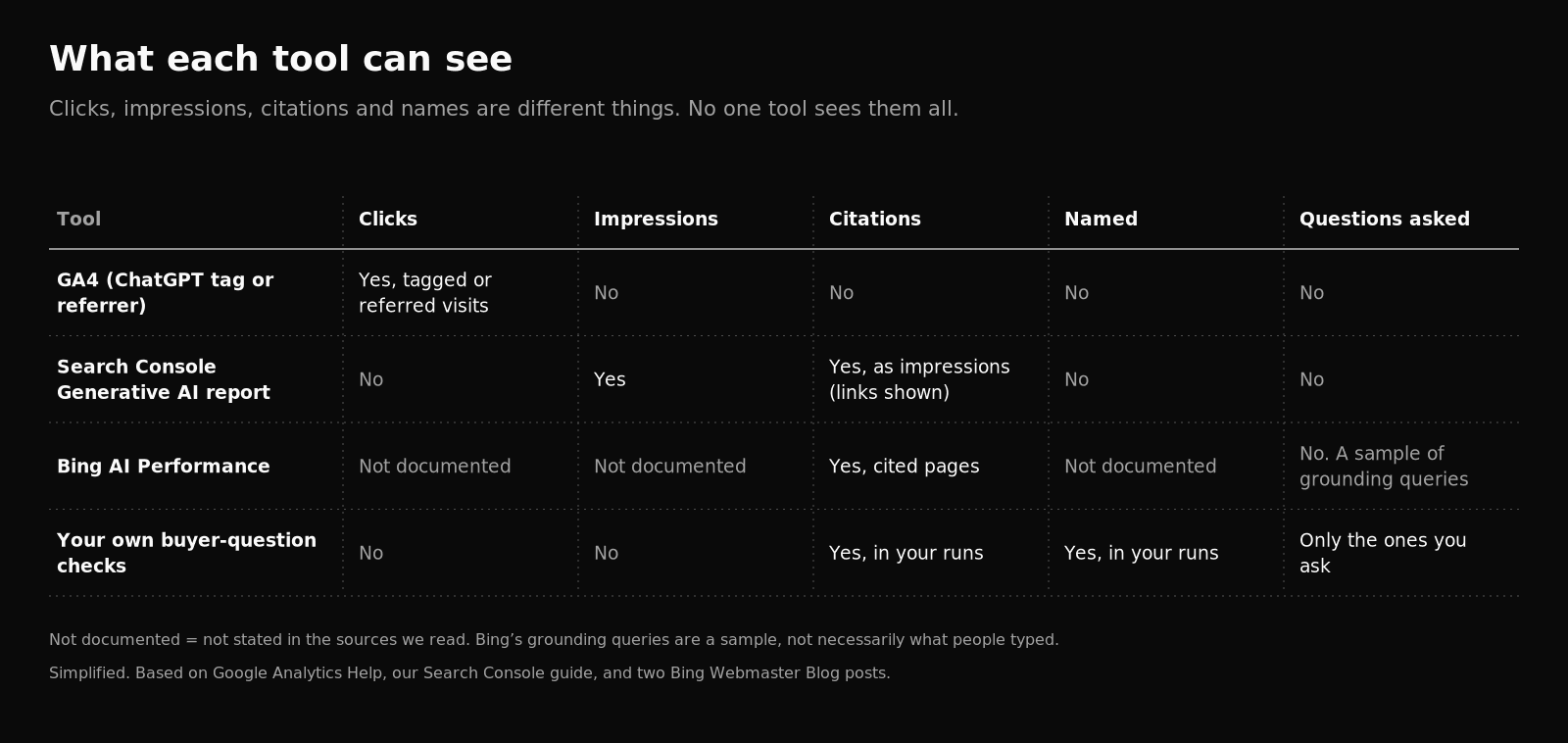
| Surface | What you can see | What you cannot see | Common misread |
|---|---|---|---|
| ChatGPT UTM / referrer → GA4 | Clicks when the link carries utm_source=chatgpt.com or a usable referrer; session source often chatgpt.com | Visits with no tag and no referrer (often land in Direct); the ChatGPT question itself | Treating Direct-only weeks as "ChatGPT died" |
| GA4 AI Assistant default channel | Sessions from sources like ChatGPT, Gemini, DeepSeek, Copilot, Grok when the referrer matches Google's AI Assistants list (medium ai-assistant) (Help) | Google AI Overviews and AI Mode (excluded from this channel); UTM-only hits without a matching referrer | Assuming the channel catches every ChatGPT click |
| GSC Generative AI report (Search) | Impressions of links in AI Overviews and AI Mode, by page, country, date, device (Help) | Dedicated AI clicks, CTR, position, or queries in that report | Adding these impressions on top of Web Performance |
| Ordinary GSC Web Performance | Overall Search impressions and clicks, including generative AI data already in the Web totals (Blog) | A clean "AI-only clicks" line item | Thinking Web totals exclude AI Overviews |
| Bing AI Performance | Citations across Microsoft Copilot, AI-generated summaries in Bing, and some partner integrations; grounding queries as a sample (Bing) | A full click ledger or exact Topic Size | Treating sampled grounding queries as exact query volumes |
| Bing Topics Portfolio (beta) | Thematic clusters, approximate counts, opportunity-query ranges (Bing, 13 Oct 2026) | Exact ledgers; smaller sites may not see the feature | Reading beta ranges as audited demand |
Find ChatGPT visits in GA4
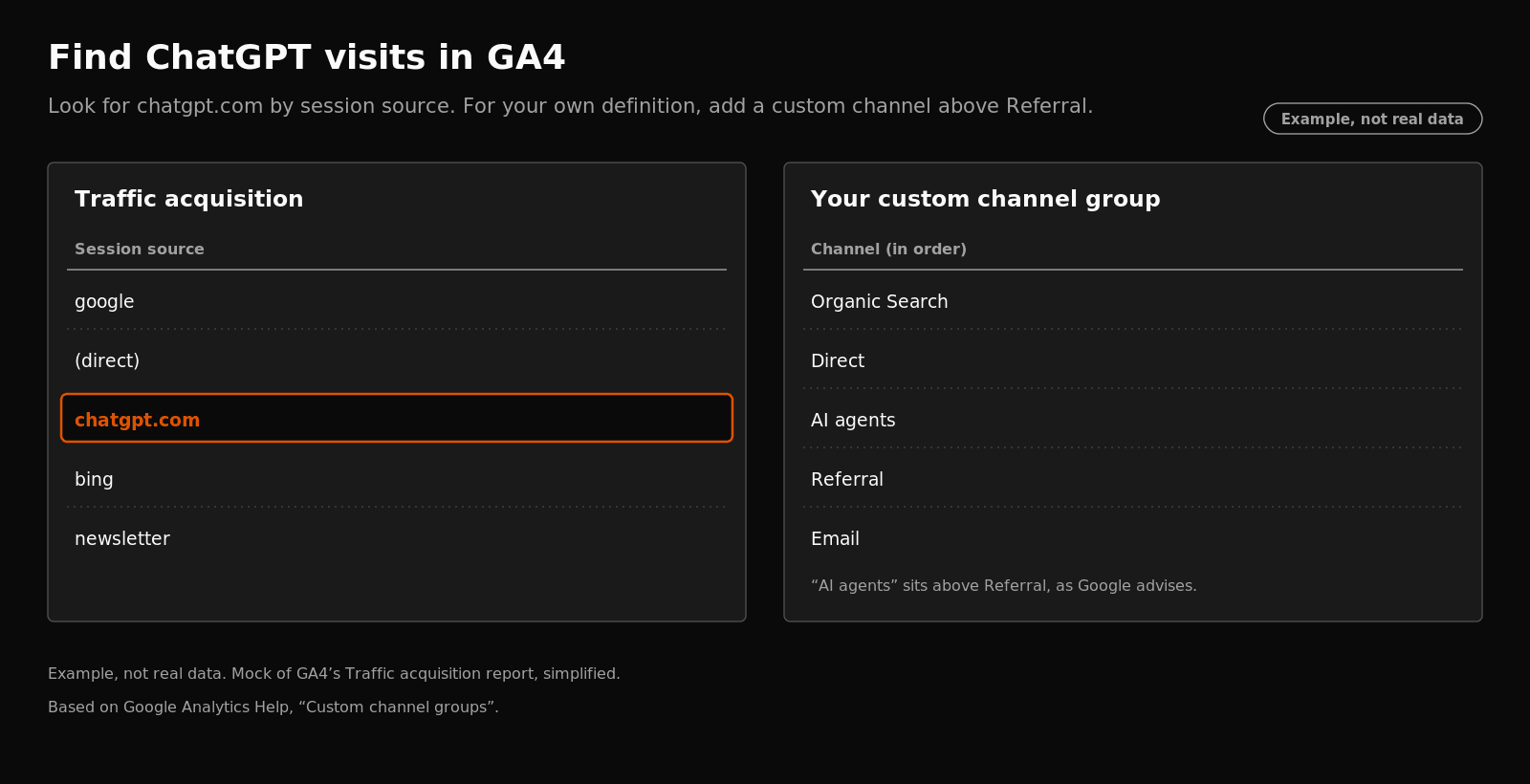
Open Acquisition > Traffic acquisition. Switch the table to Session source/medium and look for chatgpt.com.
Also check the default AI Assistant channel. Google's default channel group includes visits from sources like ChatGPT, Gemini, DeepSeek, Copilot, and Grok, and it excludes Google's AI Overviews and AI Mode. Google sets the channel from the referrer: the medium matches ai-assistant when the referrer matches the AI Assistants list, with campaign (ai-assistant) (Default channel group). UTM-tagged hits without a matching referrer may not land there, so also check Session source for chatgpt.com.
To catch AI sources the default channel does not sort there, build a custom channel group with an "AI assistants" channel. Start from Google's own example, and place the channel above Referrals, as Google says (Custom channel groups). Standard properties get two custom channel groups.
One caution on channel rules: GA4 regex conditions must match the whole value. Google's sample is broad. Prefer a tighter host regex for your own sources, then check your source list for other AI hostnames.
App traffic and referrer stripping can still push some visits into Direct. Do not invent a single OpenAI FAQ URL that "always" tags every click; use "usually when tagged."
October 2026 ChatGPT tagging gap (dated note)
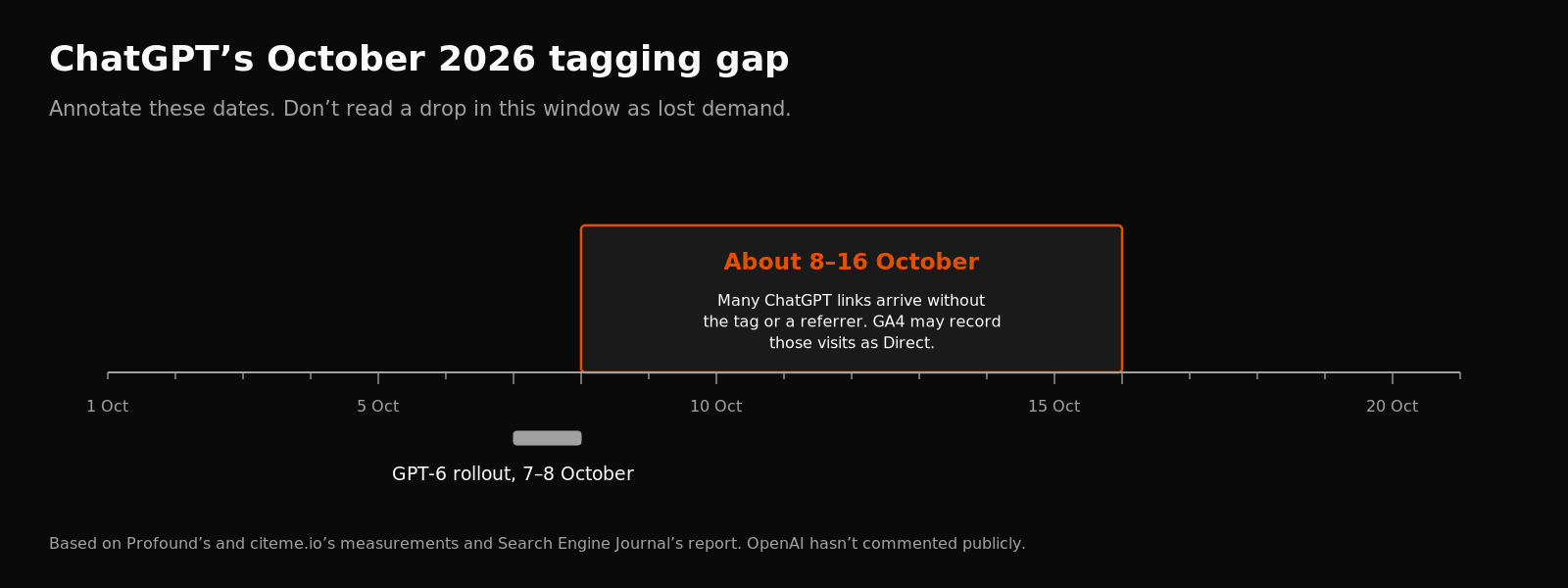
Dated industry note (secondary sources only). Between about 8 and 16 October 2026, after ChatGPT's GPT-6 rollout (7-8 October), industry reports measured many answer links arriving without utm_source=chatgpt.com and without a usable referrer, so analytics tools including GA4 could record those visits as Direct (SEJ, 15 Oct 2026; also Search Engine Land and SISTRIX coverage). Adobe's Cedric Huesler was reported as saying OpenAI told him it was a bug; that is secondhand. OpenAI has not published a primary statement, and ChatGPT release notes for that window do not mention link tracking. Annotate those dates in your reports. Do not read a drop in that window as lost demand.
Google AI Overviews and AI Mode
Search Console's Generative AI performance report (Search) shows impressions only: how often links to your site appeared in AI Overviews and AI Mode. It does not give dedicated AI clicks, CTR, position, or queries in that report.
Those impressions are already in your normal Performance (Web) totals. Google's launch post says the data is included in the overall performance report (Search Central Blog, 3 Jun 2026). Do not add Generative AI impressions on top of Web totals.
Step by step: Search Console's Generative AI report. Not seeing the report? Google gives two common reasons: too few impressions, or Settings > Search generative AI set to Exclude. Also check that pages are indexable and snippet-eligible if you are diagnosing eligibility rather than measurement.
Bing: AI Performance and Topics Portfolio (beta)
In Bing Webmaster Tools, open AI Performance. Bing documents citations across Microsoft Copilot, AI-generated summaries in Bing, and some partner integrations. Grounding queries are a sample, not a full ledger (Bing, 10 Feb 2026).
If Bing has enough data for your site, a Topics Portfolio tab may sit next to Citations & Pages. It groups grounding queries into topics with approximate counts, and lists opportunity queries (where other sites are cited and yours is not) with citation volumes shown as ranges. Bing's own limits: it is a beta, topics are an AI-generated classification, and smaller sites may not see it (Bing, 13 Oct 2026). Treat it as directional.
What no tool can see
- Answers that name you with no click. Nothing reaches your analytics.
- Buyers who read an AI answer and search your brand later. That visit looks like a normal search, so referral reports undercount.
- Tracking whether answers name you takes recorded prompt runs. See how to measure AI visibility. Being named and being cited are different results.
- No AI traffic at all? Check access first: what stops AI crawlers and AI bot access in robots.txt.
A simple monthly routine
Keep these as separate lines. Do not add them together.
- AI Assistant / custom AI channel sessions, by source (plus Session source
chatgpt.com). - Search Console Generative AI impressions, by page (spoke Guide).
- Bing AI Performance citations (and Topics Portfolio if available).
- Annotations for known gaps (including the October 2026 tagging window if it affects your trend).
- A fixed set of buyer questions, checked by hand or with a consistent prompt run.
For eligibility and controls on Google's side, see how to rank in AI Overviews. For access failures, see what stops AI crawlers.
FAQ
What does utm_source=chatgpt.com mean?
The visit came from a link in a ChatGPT answer that carried ChatGPT's tag. In GA4 it often shows as the session source chatgpt.com. Not every ChatGPT visit is tagged.
Why did my ChatGPT traffic drop in October 2026?
Often tagging, not demand. Between about 8 and 16 October 2026, industry reports measured many ChatGPT links arriving without the tag or a referrer, so GA4 could record them as Direct. OpenAI has not published a primary confirmation. See the dated note above.
Does Search Console show clicks from AI Overviews?
Its Generative AI report shows impressions only. See the spoke Guide.
Can I see which questions people asked ChatGPT?
No. Analytics shows the visit, not the question. Bing's AI Performance shows grounding queries (phrases used to find cited pages) as a sample across Copilot, Bing AI summaries, and some partners. Those are not necessarily what people typed.
Is there one number for AI traffic?
No. The tools measure different things (clicks, impressions, citations). Keep them separate.
Sources
Primary Help and vendor docs re-checked 19 Nov 2026 (Asia/Shanghai). October 2026 tagging note uses secondary industry coverage only.
- GA4 Custom channel groups (AI assistants example)
- GA4 Default channel group (AI Assistant channel)
- Generative AI performance report (Search)
- Introducing Search Generative AI performance reports (3 Jun 2026)
- Impressions, clicks, and position
- Search generative AI control
- Bing Topics Portfolio (Beta) in AI Performance (13 Oct 2026)
- Introducing AI Performance in Bing Webmaster Tools (10 Feb 2026)
- OpenAI crawlers / bots overview (crawl vs referral context; no UTM policy)
- SEJ: ChatGPT traffic drop appears to be a tracking problem (15 Oct 2026; secondary)
- Search Engine Land and SISTRIX October 2026 ChatGPT UTM coverage (secondary; same window)
- Spoke Guide: Search Console's Generative AI report